Product Expiration Dates for WooCommerce
Track product expiration dates, best before dates, and shelf life. Auto-hide expired products, send notifications, and apply discounts automatically.
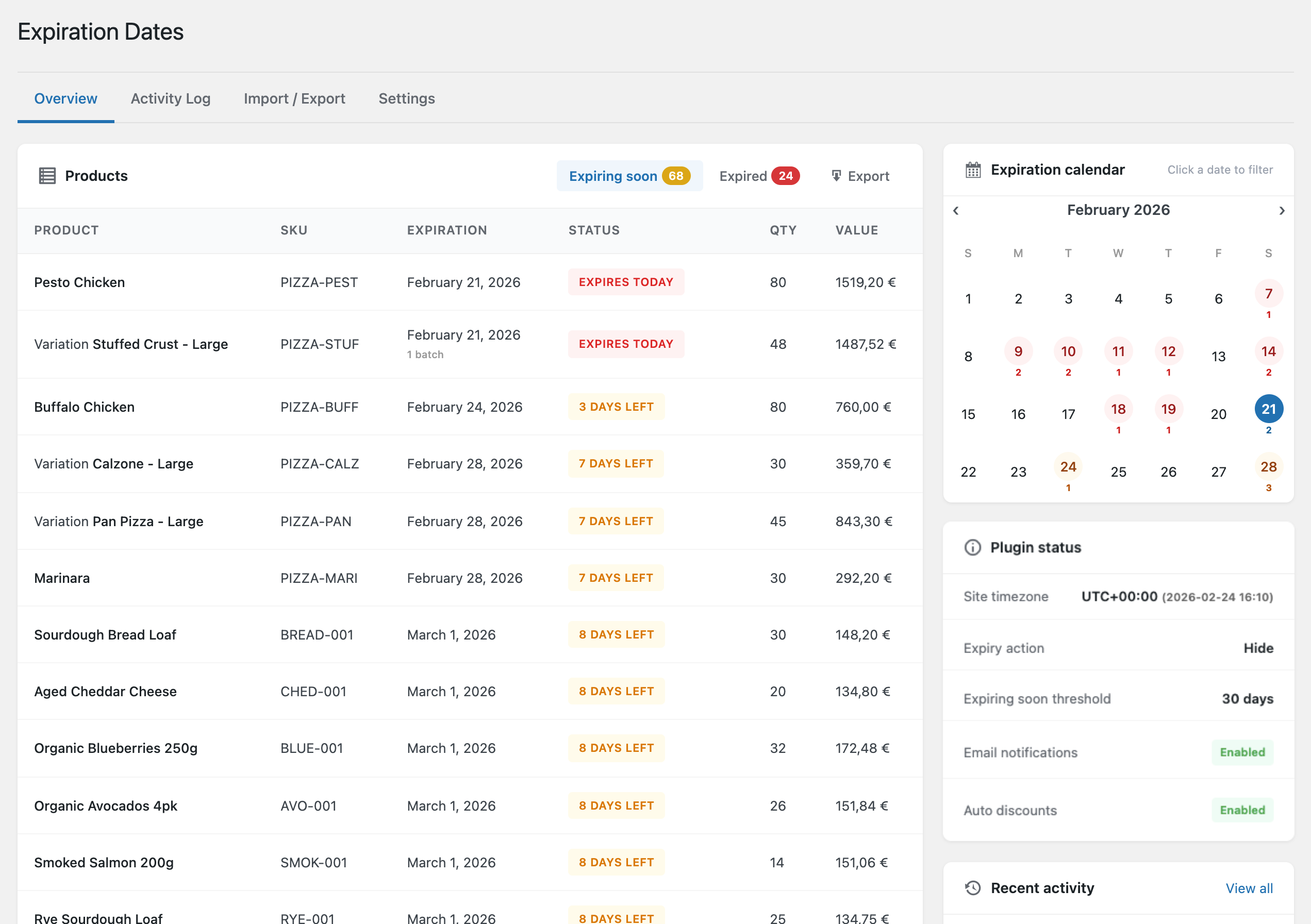
Everything you need to manage product expiration
From basic date tracking to advanced batch management and automatic discounts. Start free, upgrade to Pro when you need more.
Expiration date tracking
Set expiration dates on any product or variation. Track best before dates, use by dates, and shelf life with ease.
Automatic actions
Automatically hide expired products from your catalog or mark them out of stock. Set actions to trigger before expiration.
Cart & checkout protection
When an expiry action is enabled, expired items are blocked from being added to the cart and removed at checkout, so customers can never buy a product past its date.
Batch/lot tracking
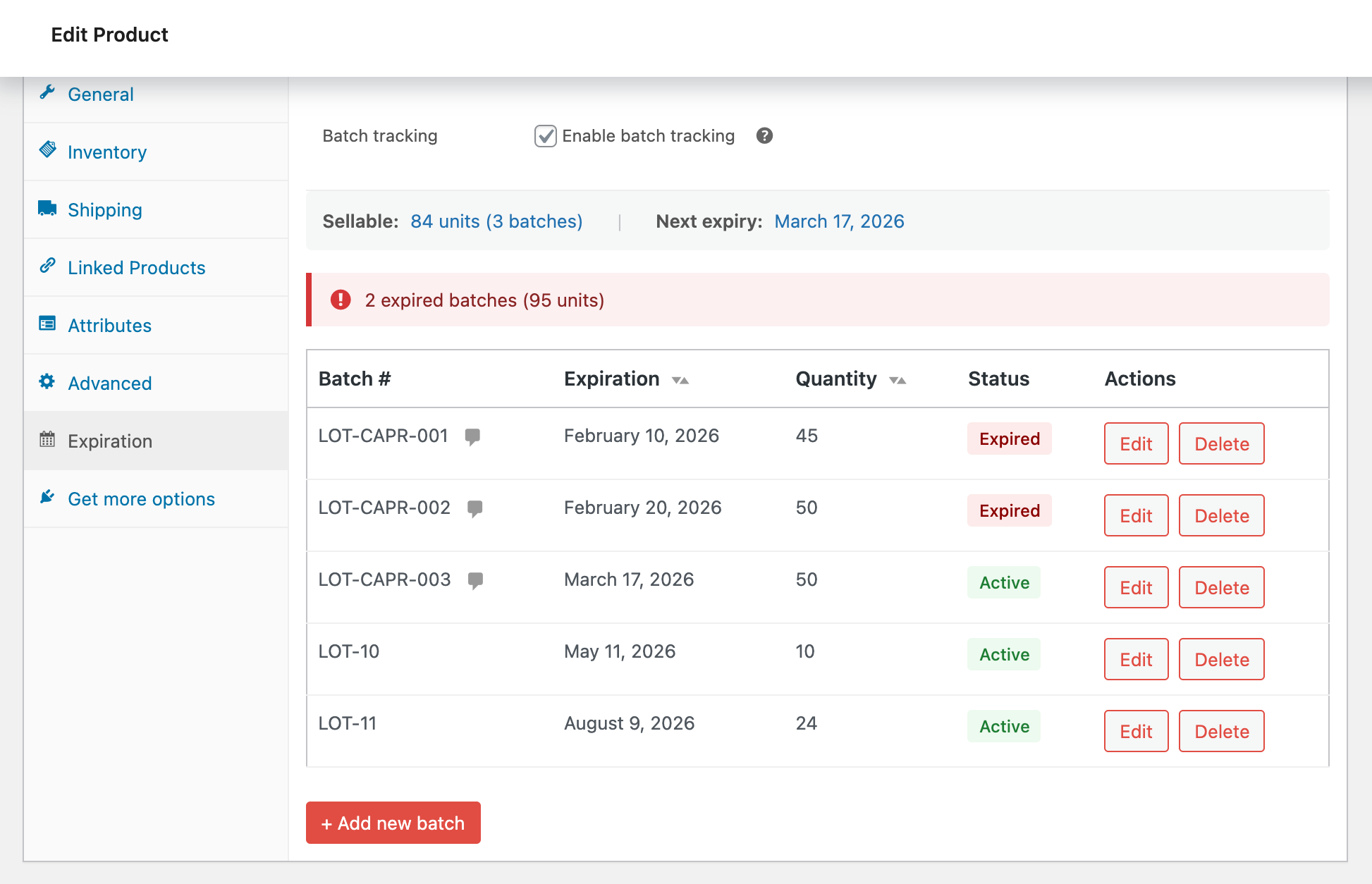
Track inventory by batch or lot number with FEFO (First Expired, First Out) automatic stock management.
Dashboard
WordPress dashboard widget and Overview page with stats cards, filterable product list, and expiration calendar. Everything at a glance.
CSV import/export
Bulk manage expiration dates via a dedicated CSV import / export page. Download every product with its date and re-upload the edited file. (Pro adds expiration columns to the native WooCommerce product CSV importer.)
Quick & bulk edit
Edit expiration dates directly from the product list. Use bulk actions to set or clear dates on multiple products.
Frontend display
Show expiration dates on your product pages. Customizable labels like "Best Before", "Use By", or "Expires".
Variable products
Give each variation its own expiration date, or set a parent default date that dateless variations inherit. The product is hidden or set out of stock only once every variation has expired.
Email notifications
Scheduled digest (daily, weekly, or monthly) of expiring products. Configurable threshold and multiple recipients. Send a test email to verify setup.
Automatic discounts
Apply tiered discounts as products approach expiration. 10% off at 14 days, 25% at 7 days, 50% at 3 days - fully customizable.
Expiring soon badges
Display eye-catching badges on products that are currently being discounted as they approach expiration. Customizable badge text to drive urgency.
Per-variation expiration dates
Set independent expiration dates on each product variation. Perfect for products with different batch dates per size or color. Included free.
REST API
Manage expiration dates programmatically. Sync with ERP, POS, and warehouse systems or build custom integrations with the WooCommerce-native REST API.
Webhooks
Get notified instantly when products expire or approach expiration. Fire HTTP events to any URL — connect with Zapier, Make, n8n, or your own systems.
Advanced notifications
Fine-tune alerts per product, category, or tag. Snooze notifications, set custom thresholds, and deliver to Slack, Telegram, or Microsoft Teams.
Simple setup, powerful automation
Get started in minutes. Set your preferences once and let the plugin manage your product expiration automatically.
Set expiration dates
Add expiration dates to your products directly in the WooCommerce product editor. Supports simple products, variations, and batch tracking.
Configure actions
Choose what happens when products expire: hide from catalog, mark out of stock, or both. Set actions to trigger days before expiration.
Let it run
The plugin handles the rest automatically. Expired products are managed, notifications sent, and discounts applied without any manual work.
Enterprise batch & lot tracking
Perfect for food, pharmaceuticals, cosmetics, and any products that require batch-level inventory management. Track multiple batches per product with different expiration dates.
- FEFO stock management
First Expired, First Out - automatically deduct stock from the batch closest to expiration.
- Order integration
See which batch was allocated to each order. Full traceability for compliance and recalls.
- Batch quantity sync
Automatic stock restoration on order cancellation. Batch quantities stay in sync with orders.
- Transaction history
Complete audit trail of all batch operations - sales, returns, adjustments.
- Batch swap on orders
Replace a batch allocation on any order line item. Swap to a different batch without cancelling — stock adjusts automatically.
See it in action
A clean, modern interface that integrates seamlessly with WooCommerce.
Choose your plan
Start free with core tracking, dashboard, and CSV export. Upgrade to Pro for batch tracking, notifications, discounts, and more.
Free
Perfect for getting started
- Core expiration tracking
- Per-variation expiration dates
- Auto hide / out of stock / both
- Cart & checkout protection
- Quick & bulk editing
- Dashboard, reports & calendar
- CSV import/export (dedicated page)
- Community support
Pro
1 site license
$79/yr locked in for life · Regular $99/yr
- Everything in free
- Email notifications
- Automatic discounts
- Expiring soon badges (shown on auto-discounted products)
- Batch/lot tracking & FEFO
- WooCommerce CSV integration
- Priority email support
Agency
Unlimited sites
$199/yr locked in for life · Regular $249/yr
- Everything in Pro
- Unlimited site licenses
14-day free trial · 14-day money-back guarantee · Cancel anytime
Full feature comparison
| Feature | Free | Pro | Agency |
|---|---|---|---|
| Expiration date field on products | |||
| Variable product support (parent fallback) | |||
| Quick edit & bulk edit | |||
| Frontend date display | |||
| Automatic hide/out of stock | |||
| Cart & checkout protection | |||
| Product list expiration column | |||
| Dashboard widget & stats page | |||
| Expiration calendar | |||
| Activity log | |||
| CSV import/export (products) | |||
| WooCommerce CSV integration | |||
| Batch/lot tracking & FEFO | |||
| Batch order integration | |||
| Batch transaction history | |||
| Email notifications (scheduled digest) | |||
| Automatic discounts (tiered) | |||
| Expiring soon badges (with automatic discounts) | |||
| Per-variation expiration dates | |||
| Combined expiry action (hide + out of stock) | |||
| Batch swap on orders | |||
| Priority email support | |||
| Unlimited site licenses | |||
| REST API Coming soon | — | — | — |
| Webhooks Coming soon | — | — | — |
| Advanced notifications Coming soon | — | — | — |
Frequently asked questions
Everything you need to know about Expiration Dates for WooCommerce.
Does this work with variable products?
Yes! The free version lets you set an independent expiration date on each variation, or a parent default date that dateless variations inherit. The product is hidden or set out of stock only once every variation has expired.
What happens when a product expires?
You choose what happens: hide the product from your catalog, mark it as out of stock, or both. You can also set actions to trigger a certain number of days before expiration. All of these are included free.
Can I display expiration dates on my store?
Absolutely. You can show expiration dates on product pages with customizable labels like "Best Before", "Use By", or "Expires".
What is batch/lot tracking?
Batch tracking (Pro) lets you manage multiple inventory batches per product, each with its own expiration date and quantity. The plugin uses FEFO (First Expired, First Out) to automatically deduct from the batch closest to expiration.
How do automatic discounts work?
You set up discount tiers based on days until expiration (e.g., 10% off at 14 days, 25% at 7 days). The plugin automatically applies the appropriate discount and can show an "Expiring Soon" badge. This is a Pro feature.
Can I import expiration dates from a CSV?
Yes! Product-level CSV import/export is included free via a dedicated import / export page. Pro additionally adds an expiration-date column to WooCommerce's built-in product CSV importer/exporter, so you can manage expiry dates as part of your normal catalog workflow.
Is there a free version?
Yes! The free version includes expiration tracking (including per-variation dates), auto hide / out of stock / both, quick/bulk edit, dashboard with stats, reports & calendar, activity log, and CSV import/export. Pro adds batch/lot tracking, email notifications, automatic discounts, expiring-soon badges, and WooCommerce-native CSV integration.
How does the 14-day free trial work?
Start your 14-day trial at checkout (no charge up front) and you’ll receive a license key. Install the free plugin from WordPress.org plus the Pro add-on, then enter your key under Products → Expirations → Settings → License to unlock full Pro features for 14 days. After the trial it auto-charges the annual rate unless you cancel.
What's the difference between Pro and Agency?
Same features - the only difference is licensing. Pro is $79/yr (1 site), Agency is $199/yr (unlimited sites) at launch pricing. Both include a 14-day free trial.
What is launch pricing?
We're offering special launch pricing for early adopters. Pro is $79/yr (regular $99) and Agency is $199/yr (regular $249). Sign up now and keep your rate for life — prices go up after launch.
Can I get a refund?
Yes. Every Pro and Agency purchase is covered by a 14-day money-back guarantee. If you’re not satisfied, email hello@sellinor.dev within 14 days of purchase for a full refund — no questions asked. Payments are processed by Lemon Squeezy, our merchant of record.
Do I need to renew every year?
Your license renews annually at the same rate you signed up at. Launch pricing customers keep their discounted rate for life. You can cancel anytime.
What kind of support is available?
Free users can get help through the WordPress.org support forums. Pro and Agency users get priority email support directly from our team.
Still have questions?
Contact us →Guides & tutorials
Step-by-step setups and industry playbooks for tracking expiration dates, rotating stock by FEFO, and clearing short-dated inventory.
Start managing product expiration today
Stop losing sales to expired products. Start managing expiration dates the smart way.
Free plan available • 14-day Pro trial • No credit card required